TRADEZELLA VS TRADERVUE.
TradeZella and Tradervue do the same basic job. You connect a broker or upload a file, and each one turns your fills into charts, statistics and reports you can review.
Where they differ is how much they try to do around that, and what they charge for it.
TradeZella suits the active trader who wants everything in one place: trade replay, a backtester, an AI that reviews your sessions, and shared rooms for trading groups and prop-firm accounts. It costs more. Plans start at $35 a month, and unlimited replay and the AI agents sit on the $59 Pro plan.
Tradervue suits the trader who wants a straightforward journal with solid reports, and the option to put it in front of a mentor. It's cheaper, and it has a free plan that imports up to 30 trades a month. On the pages we read, it offers no trade replay and no AI.
Below you'll find a side-by-side table, where each one is genuinely better, and where TradePiko fits if you swing trade. Every competitor fact comes from the vendor's own website, read on 31 October 2026.
TradeZella vs Tradervue at a glance
| TradeZella | Tradervue | TradePiko | |
|---|---|---|---|
| Paid plans, billed monthly | Essential $35 · Pro $59 · Ultra $99 | Silver $29.95 · Gold $49.95 | Standard $20 · Pro $40 |
| Billed annually | $26 · $44 · $74 a month (saves 25%) | No annual price on its pricing page | $16 · $32 a month (saves 20%) |
| Free plan | None mentioned | Yes: 30 imported trades a month, basic journaling and reports | No |
| Free trial | None mentioned | On Silver and Gold at sign-up (length not stated) | 7 days on Pro; Standard bills right away |
| Broker connections | 500+ broker and prop-firm integrations (sync or file upload) | 80+ integrations (Broker Sync or file import) | 40 brokerages and crypto exchanges, plus CSV |
| Accounts | Essential 1 · Pro up to 50 · Ultra unlimited | Unlimited on Silver and Gold | Multiple accounts on Pro |
| Markets | Stocks, options, forex; futures on select exchanges; crypto by manual entry | Stocks/ETFs, futures, options, forex | Stocks, ETFs and options (no futures or forex) |
| Charts of your trades | Replay charts with entry and exit markers | Auto-generated charts on several timeframes, entries and exits marked | Every trade on its daily chart, entry and exit plotted |
| Trade replay | Unlimited on Pro and Ultra; Essential unclear (its pages disagree) | None found | No |
| Backtesting | Manual bar-by-bar on every plan; AI backtests on Pro (10/mo) and Ultra (100/mo) | None found | No backtester; Trade Simulation re-scores your own past trades (Pro) |
| MFE / MAE | Every plan | Yes (tier not shown) | Pro |
| Reports | 300+ reports, R-multiples, notebook, playbooks | 100+ reports; exit performance and max potential P&L on Gold | Stats dashboard, P&L calendar, setup and mistake tags; R multiples from your broker's stop orders |
| AI | Zella AI on every plan (500 / 1,500 / 3,000 credits a month); agents on Pro and Ultra | None found | AI Trade Coach (Pro) |
| Sharing and mentoring | Spaces and Mentor Mode (create and invite from Pro) | Community sharing; unlimited mentors on Silver and Gold | Share cards showing percentages only |
As of November 2026, from each vendor's own pricing and help pages, read 31 October 2026. Prices in US dollars. "None found" means the feature did not appear on the pages we read, not that it can never exist. Check each site before you buy.
Where TradeZella is better
Replay and backtesting
This is the clearest difference.
TradeZella replays a trade tick by tick or second by second, with your entry and exit marked and the speed adjustable, so you can watch how price behaved around your decisions. It also has bar-by-bar backtesting on more than 11 years of data, which you can run by hand on every plan. On top of that, there are AI backtests written in plain English on Pro (10 a month) and Ultra (100 a month). Tradervue offers neither on the pages we read.
One caveat. Unlimited replay, the 1-second chart and Replay AI Insights are on Pro and Ultra.
For Essential, TradeZella's own pages disagree. The pricing page marks replay as not included, while its pricing help article (13 July 2026) says Essential gets 10 replays a month. So if replay is the reason you're choosing TradeZella, budget for Pro.
AI that reviews for you
TradeZella now leads with AI. Zella AI answers questions about your performance, flags tilt and behaviour patterns, sends a weekly digest, and writes a weekly and monthly review report.
Pro and Ultra add agents for session reviews, auto-tagging and a game plan. And every plan comes with a monthly allowance of AI credits: 500, 1,500 or 3,000.
Broker reach and prop firms
TradeZella lists 500+ broker and prop-firm integrations, against Tradervue's 80+, and there's a PropFirm Sync dashboard on every plan. If you trade several funded accounts, Pro covers up to 50 active accounts, and Ultra is unlimited.
Groups and learning
Spaces gives a trading group private rooms, live trade sharing, challenges and leaderboards, and Mentor Mode lets a coach follow along. Zella University and a library of webinars and bootcamps come with it.
Tradervue's mentoring is simpler, as you'll see in the next section.
Where Tradervue is better
Price, and a real free plan
Tradervue's free plan imports up to 30 trades a month, with basic journaling and reporting. The cap counts trades imported in a calendar month, not trades that took place in it.
So a swing trader who closes fewer than 30 trades a month can journal on it at no cost. TradeZella mentions neither a free plan nor a free trial on its pricing page or pricing help article, and third-party reviews say there's none.
The paid plans are cheaper too. Silver is $29.95 a month, against $35 for TradeZella Essential, and it includes unlimited imports, unlimited trading accounts, broker sync and advanced reporting. Essential is limited to one active account.
TradeZella does win on annual billing, though. It's $26 a month billed yearly, whereas Tradervue's pricing page shows no annual price at all.
Mentoring without the extras
Both paid Tradervue plans allow unlimited mentors and mentees. If your review process is you and a coach going through your trades, that's the feature you need, and you're not paying for rooms, leaderboards and agents you won't use.
On TradeZella, Essential can only join a Space. Creating one and inviting people starts on Pro, at $59.
Exit analysis on Gold
Gold ($49.95) adds trade exit performance analysis and maximum potential P&L. Together they measure how much of each move you actually kept, which is a direct read on whether you sell too early. Gold also adds commissions and fees support.
Charts on every trade, on several timeframes
Tradervue generates a price chart for each trade on multiple timeframes, with your entries and exits marked on a TradingView chart. TradeZella shows entry and exit markers on its replay charts, but on the pages we read it doesn't describe automatic trade charts by name.
Which one for which trader
- Day traders, futures traders and prop-firm traders: TradeZella, on Pro if replay matters to you. Its emphasis on replay, sessions and funded accounts is aimed squarely at you.
- Traders on a budget, or with fewer than 30 trades a month: Tradervue's free plan, moving to Silver when you outgrow it.
- Traders who review with a mentor: Tradervue Silver for one-to-one mentoring; TradeZella Pro if you run or belong to a larger group.
- Swing traders holding for days or weeks: read on.
Where TradePiko fits for swing traders
Neither product is built around swing trading.
TradeZella never mentions swing or day traders, and it puts its weight on replay, sessions, prop firms and futures. Tradervue doesn't address swing traders either, and its broker list leans towards day-trading platforms such as DAS, Sterling, Lightspeed and TradeZero. Both work for a swing trader, but neither is shaped around a three-week hold.
TradePiko is. It's a journal for stocks and ETFs held for days to weeks, and the features follow from that:
- Trade Simulation. Override a trade's P&L, split it into a partial and a runner (a quarter, a third or a half), change its size or exclude it. Or apply presets such as Cut Losers Faster, Remove Worst or By Mistake, then compare the result with what you actually did. It works on your real trades; it isn't a backtester and doesn't invent exit rules for you.
- AI Trade Coach. 13 analysis modes that answer from your own trade history: what's costing you money, why your winners work, or anything else you ask about your trading.
- The PIKO 50, a nightly list of 50 momentum leaders. It screens for the top 5% of stocks by relative strength, with ADR above 4%, at least $30M a day traded and price above the 65-day average, then ranks them by dollar volume, with ADR%, average dollar volume and earnings dates.
- Live Position Analytics on what you hold now: open risk, ADR multiple, worst case if every stop hit, and each position's R multiple from your broker's stop orders.
- Position Sizing Advisor, driven by your own rolling win rate.
- MFE and MAE across the whole hold: how far each trade ran for you, and how far it went against you first.
- A Daily Report Card, Model Books of setup examples, and every trade on its daily chart with entry and exit plotted, pulled in automatically after broker sync.
Pricing: Standard is $20 a month, or $16 a month billed annually. It covers broker sync, the journal and CSV import, Live Position Analytics, auto-generated charts, the stats dashboard, the calendar, the mistake tracker and tags.
Pro is $40 a month, or $32 billed annually, and adds the AI Trade Coach, Trade Simulation, MFE/MAE, the Position Sizing Advisor, the Daily Report Card, Model Books, the PIKO 50 and multiple accounts. Pro has a 7-day free trial; Standard bills right away.
And where it isn't the answer: TradePiko connects to 40 brokerages and crypto exchanges, which is far fewer than TradeZella or Tradervue (CSV import covers the rest). It has no trade replay, no strategy backtester and no mentor rooms, and it's built for stocks and ETFs rather than futures or forex. If you only want a basic log of fewer than 30 trades a month, Tradervue's free plan costs nothing.
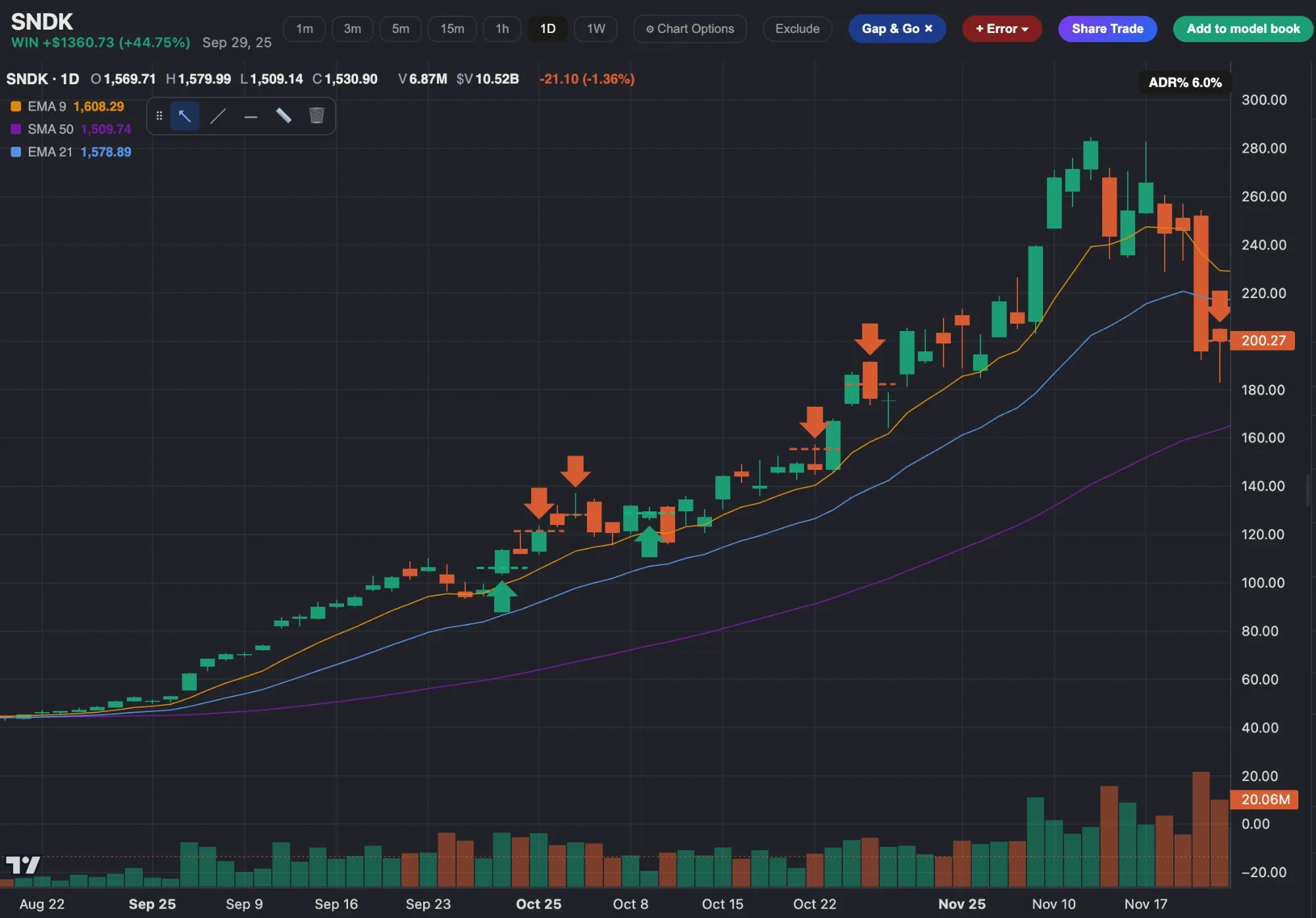
See every swing trade on its daily chart
Connect your broker and TradePiko charts each trade with the entry and exit plotted, then measures how far it ran for you and against you while you held it.
Sources. TradeZella: tradezella.com pricing page and homepage, and its help-centre articles "Our pricing" (13 July 2026) and "Getting started with TradeZella"; asset coverage from a TradeZella help-centre search result; the free-trial point is also reported by daytradingtoolkit.com. Tradervue: tradervue.com homepage, /site/pricing/, and its help pages on the free-plan import quota, Broker Sync versus Standard Import, and supported brokers. All read 31 October 2026. Vendor pages show prices with "$" and no currency name; we assume US dollars. TradePiko: tradepiko.com/pricing. Features and prices change often, so check each site before buying. Educational content only.